
Science Oxford Logo

Step-by-Step - creating the snowman's eyes


Position the first eye

Create a New Object, and add a Cylinder.

Change the Radius to a good eye size.

Add a Move block. Change both X and Y, so that it moves up and across.

Using a negative number moves in the opposite direction to a positive number.
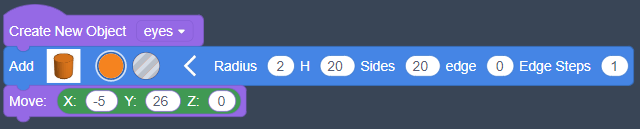
Create New Object eyes; Add Cylinder Radius(2); Move X(-5), Y(26)

Add a repeat loop

From the Control menu, find the Repeat 1 Times block.
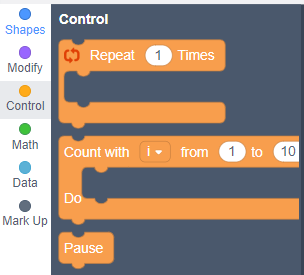
On the left is the menu option, Control has an orange dot. On the right are three blocks. The first one is a loop shape, it has connectors on the top and bottom, and also connectors inside it.

Drag-and-drop it so that it surrounds the earlier code, and change the number to 2 Times.
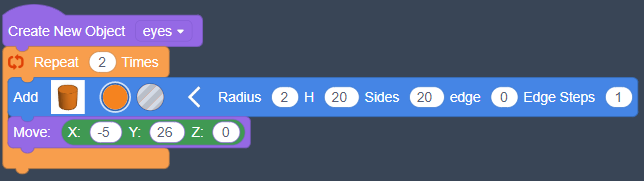
Create New Object eyes; Repeat 2 Times; Add Cylinder Radius(2); Move X(-5), Y(26); end of repeat loop

You must move the second cylinder, so that it doesn't go to the same place as the first one.

Add another Move block, underneath the loop.
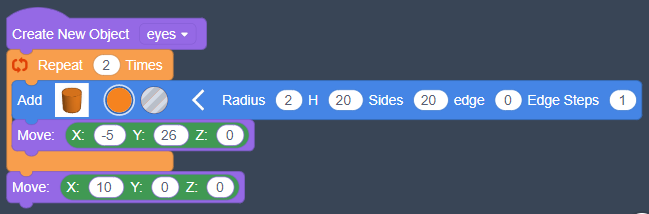
Create New Object eyes; Repeat 2 Times; Add Cylinder Radius(2); Move X(-5), Y(26); end of repeat loop; Move X(10), Y(0)

Group as a hole

Add a Create Group block to the end of your code.

Instead of choosing a colour, select the transparent box next to it.

This option makes the eyes a hole, so they can be cut out of the design.
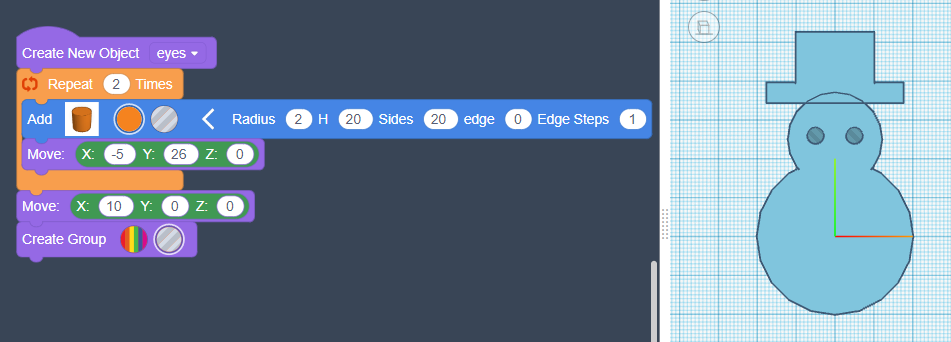
the same code as earlier, with a Create Group block underneath, the second circle has been selected, which is transparent.