
Copy and paste all of the code below into a New tab in Mu.
To skip to the explanation, and ideas for next steps, click here.
from microbit import *
import random

def needed():
    needs[random.choice(list(needs.keys()))] = True

def pet_happy():
    return all(value is False for value in needs.values())


needs = {
         'hungry': False,
         'sleepy': False,
         }


while True:
    sleep(100)
    if button_a.was_pressed():
        needed()
    if pet_happy():
        display.show(Image.HEART)


    if needs['hungry'] is True:
        display.show('H')
    if needs['sleepy'] is True:
        display.show('S')


    if button_b.was_pressed():
        needs['hungry'] = False
    if accelerometer.was_gesture('face down'):
        needs['sleepy'] = False
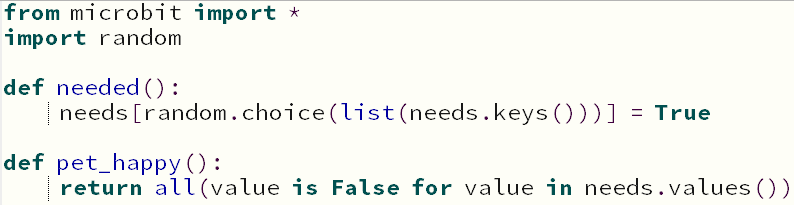
Firstly, it imports the libraries we need to use the micro:bit and random methods.
Then, it defines two functions, needed() and pet_happy(), which means you can use them further down in the code.
needed() chooses a random thing from the dictionary called needs, and sets that choice to True
pet_happy() looks through the dictionary called needs, and checks that everything in it is False.

This is a dictionary called needs - note the curly brackets {}.
To add more of your pet's needs, follow this format:
'name-of-need': False,
The name is inside apostrophes, there is a comma after False, and the two parts are seperated by a colon.
All of your pet's needs must be inside the curly brackets.

Your main code starts here, with a while True forever loop.
First, we slow the loop down with a short sleep.
Now we start to use the functions defined earlier on in the code:

Here, still inside the while True forever loop, is where you set how your pet communicates with you.
To add more needs, add extra if statements, and change the type of need.

Here, still inside the while True forever loop, is where you set how you respond to your pet's needs.
To fulfil more needs, add extra if statements, and change both the type of need, and how you will respond to it.
There are lots of different accelerometer gestures you can use here!
'face up''face down''shake''up''down''left''right'Your pet can be more than just hungry and sleepy, and they can communicate with you in lots of different ways.
Think about what features you want your pet to have, and how they would fit into the structure of the code.
Update the starter code to personalise your cyber pet.