
Add Fonts to your Website
These instructions show you how to add new fonts into your project.
These instructions show you how to add new fonts into your project.
Your computer has lots of fonts installed, but not every computer will recognise the same fonts.
By linking to an online font, you can make sure that anyone who reads your story will see what you want them to see.
Visit fonts.google.com, and look through the available fonts.
When you find one that you like, click on it. You should see a screen like the below picture.
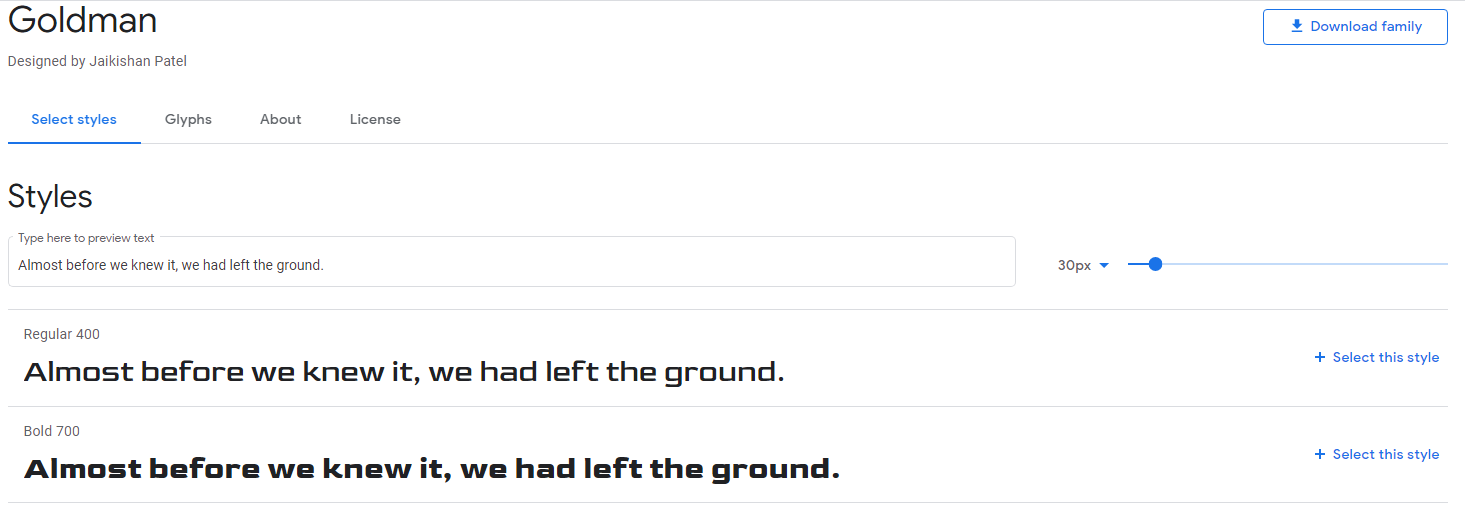
Choose the style that you want to use in your project, then click + Select this style on the right hand side.
A sidebar will show up, showing you the information you need to use this font in your project.
Click @import instead of <link>.
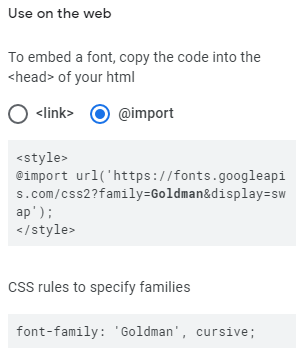
Copy part of the first bit of code from your font information. From @import to the semi-colon, do not include the top and bottom <style>.
Go back to Trinket, and choose the style.css tab. Past this new code at the top, on a new line.
Now you need to decide where you want to use this font - for your whole website, for the paragraph text only, the headings only?
Copy and paste the second bit of code from your font inside one of your sets of curly brackets.
@import url('https://fonts.googleapis.com/css2?family=Goldman&display=swap');

/* Instructions to display the whole page */
body {
  font-family: 'Goldman', cursive;
  background-color: White;
}
The example code above will import the font 'Goldman', then change the font of all of the text.
You can import as many fonts as you like, to use in different parts of your website.