
Resources for the 'Space Race' Creative Computing Club.
During this workshop, you will create a quiz program in Python, then investigate data from the Globe at Night project.
This page recaps what we discussed as a group.
It's British Science Week! So we're going to do some scientific computing in this workshop.
We will writing code using the Python programming language - this is often used by scientist to do their research!
We will use Trinket as our editor. You can run and edit the code snippets directly from these instructions, or open each file seperately.
Save your work by saving the link from the sharing menu, or by remixing the file into your own Trinket account.
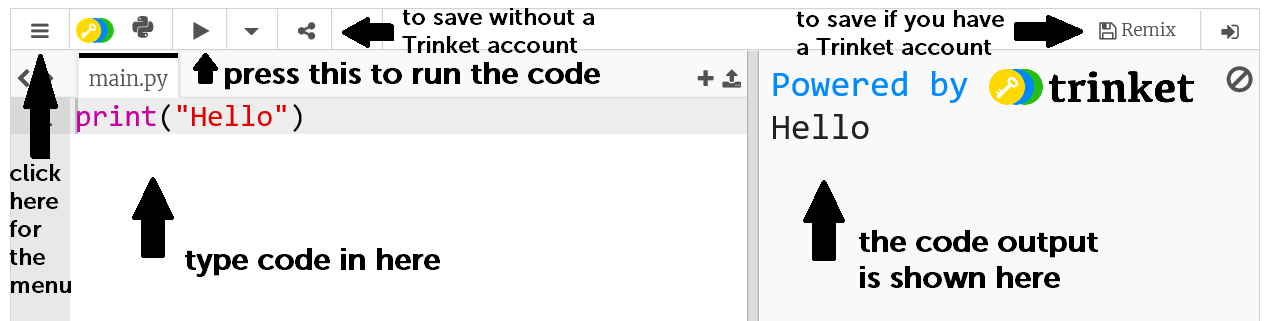
Be patient when you code in Python - you will get error messages as you go along and this is completely normal! Whenever you make changes to your code, run the new program and make sure it works - we will discuss troubleshooting tips as we go along.
Run this code buy clicking the > button on the top.
You can access this directly on the Trinket website by clicking here.
Can you edit the code to show the answers instead of the questions?
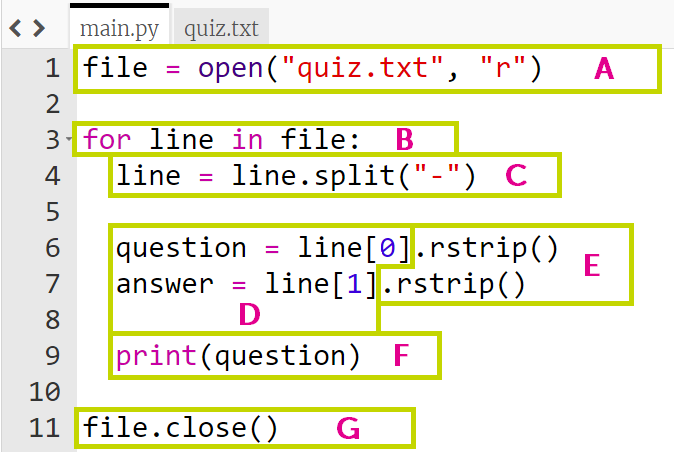
0 instead of from 1, so line[0] is the first half of the line!Did you notice the gap on the left before some of the lines? This is called indentation, and is how Python knows which lines of code are inside the for loop!
Can you add some of your own questions to the quiz?
Check that the code still works if you print all the questions, and if you print all the answers!
Instead of putting all the questions on the screen at once, we can tell the program to print the first one, then wait for user input.
Click on line 10, after print(question), and add the following code:
response = input("What is the answer?")
Test this code - what happens when you type in an answer?
If you get an error message, check your indentation - make sure the new code lines up with the line before it.
We can improve the quiz game by checking if the response given is the same as the answer in the file.
Make a new line after line 10 and type the code below - make sure the new code lines up with with code above it.
if response == answer:
  print("Correct, well done!")
Test it out:
If you get an error:
== between response and answer - this means 'is it equal to?'You can expand this code further by getting something different to happen if the answer is not correct.
else:
  print(" ")
Try adding this to your code - where should you put it? What do you want to put in the brackets?
Remember to keep testing your code to check for errors!
To view the full code example, click here.
Click here to move on to the Globe at Night project
A few ideas of things to add to your quiz are below - or ask us for help to implement your own ideas!