
You can tell the micro:bit to play a musical note instead of, or as well as, showing a letter on its display.
Your changes will only effect what the micro:bit does in the game, so find this section in the code to edit!
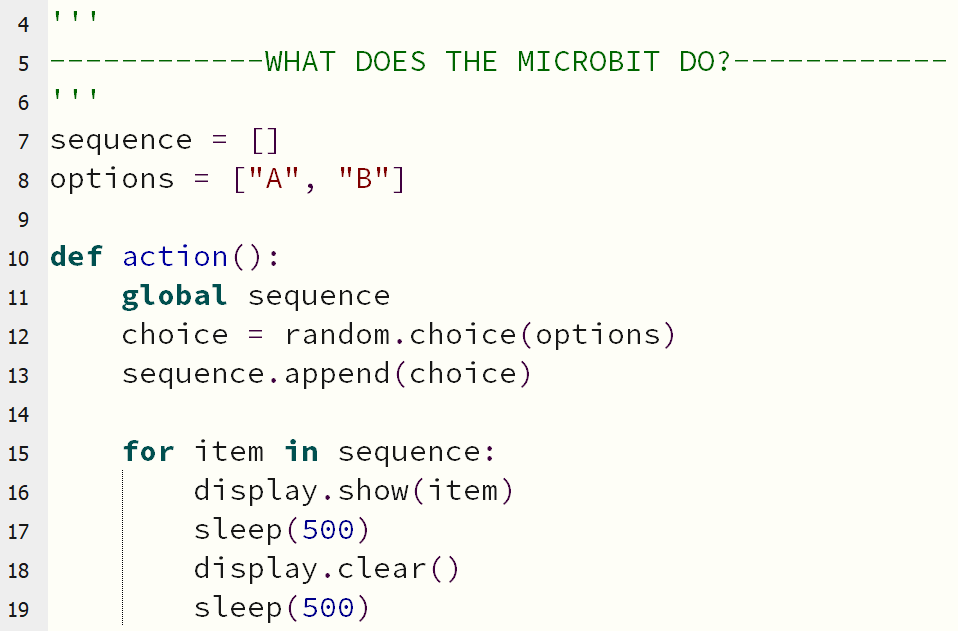
The last chunk of code within this section controls what the micro:bit shows on its display.
for item in sequence tells the micro:bit to look at everything in its list of choices ( sequence ), and do something with all of them.
What it currently does is display.show() each option!
Collect the following items...
The current options the micro:bit can choose from are the letters A and B.
Those letters can be shown on the display, but are also both musical notes.
Look carefully at how the display.show() line of code is structured.
To play musical notes, you can use the following code:
music.play(item)
Try to put this new code in the correct place - do you want it to play instead of showing the letter, or to do both?
How about adding extra options, so the micro:bit can play more than two notes?
Click here for some help!